Custom Controls
While Flet provides 140+ built-in controls that can be used on their own, the real beauty of programming with Flet is that all those controls can be utilized for creating your own reusable UI components using Python object-oriented programming concepts.
You can create custom controls in Python by styling and/or combining existing Flet controls.
Styled controls#
The most simple custom control you can create is a styled control, for example, a button of a certain color and behaviour that will be used multiple times throughout your app.
To create a styled control, you need to create a new dataclass in Python that inherits from the Flet control you are going to customize, Button in this case:
@ft.control
class MyButton(ft.Button):
    bgcolor: ft.Colors = ft.Colors.ORANGE_300
    color: ft.Colors = ft.Colors.GREEN_800
    style: ft.ButtonStyle = field(
        default_factory=lambda: ft.ButtonStyle(
            shape=ft.RoundedRectangleBorder(radius=10)
        )
    )
    expand: int = 1
You can define either @dataclass or @ft.control decorator on the inherited class - both methods works the same:
@dataclass
class MyButton(ft.Button):
    bgcolor: ft.Colors = ft.Colors.ORANGE_300
    color: ft.Colors = ft.Colors.GREEN_800
    style: ft.ButtonStyle = field(
        default_factory=lambda: ft.ButtonStyle(
            shape=ft.RoundedRectangleBorder(radius=10)
        )
    )
    expand: int = 1
You can also set properties in init() method:
@ft.control
class MyButton(ft.Button):
    def init(self):
        self.bgcolor = ft.Colors.ORANGE_300
        self.color = ft.Colors.GREEN_800
        self.style = ft.ButtonStyle(
            shape=ft.RoundedRectangleBorder(radius=10)
        )
        self.expand = 1
Rules
-
You should define either @dataclass or @ft.control decorator on the inherited class - both methods works the same.
-
A field, to be a class field, must have a type annotation, so
expand: int = 1will override inherited property, butexpand = 1won't. Not sure which type to use? JustAnywill work, for exampleexpand: Any = 1. -
Use literal default value for simple data types, such as
int,bool,strandfield(default_factory=lambda: <new_value>)for immutable types such asclass,list,dict. -
You can set property values in
init()method, but you won't be able to override if writeMyButton3(expand=False).
Now you can use your brand-new control in your app:
import flet as ft


@ft.control
class MyButton(ft.Button):
    bgcolor: ft.Colors = ft.Colors.ORANGE_300
    color: ft.Colors = ft.Colors.GREEN_800

def main(page: ft.Page):
    def ok_clicked(e):
        print("OK clicked")

    def cancel_clicked(e):
        print("Cancel clicked")

    page.add(
        MyButton(content="OK", on_click=ok_clicked),
        MyButton(content="Cancel", on_click=cancel_clicked),
    )

ft.run(main)
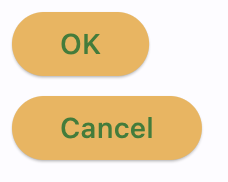
See example of using styled controls in Calculator App tutorial.
Composite controls#
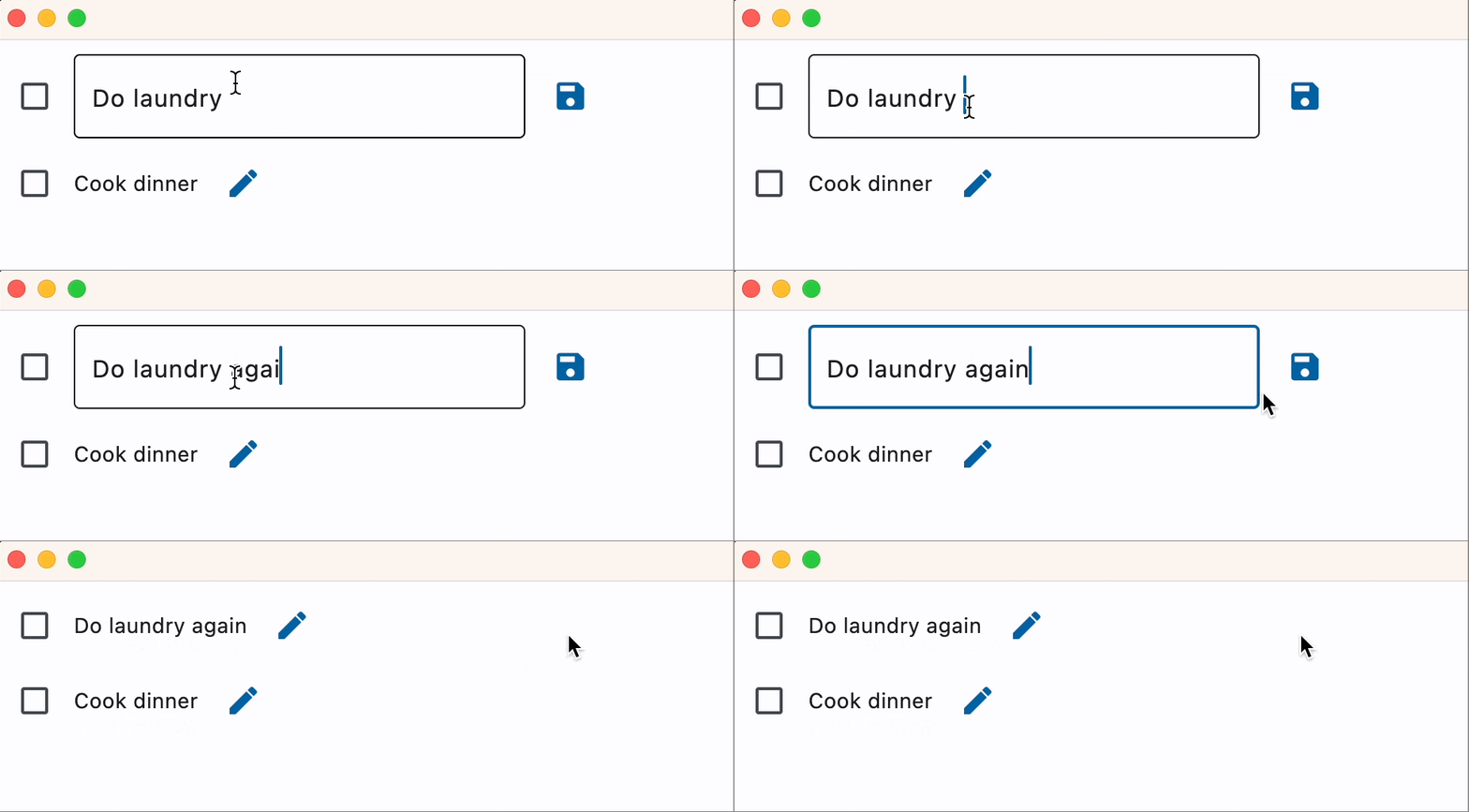
Composite custom controls inherit from container controls such as Column, Row, Stack or even View to combine multiple Flet controls. The example below is a Task control that can be used in a To-Do app:
import flet as ft


@ft.control
class Task(ft.Row):
    text: str = ""

    def init(self):
        self.text_view = ft.Text(value=self.text)
        self.text_edit = ft.TextField(value=self.text, visible=False)
        self.edit_button = ft.IconButton(icon=ft.Icons.EDIT, on_click=self.edit)
        self.save_button = ft.IconButton(
            visible=False, icon=ft.Icons.SAVE, on_click=self.save
        )
        self.controls = [
            ft.Checkbox(),
            self.text_view,
            self.text_edit,
            self.edit_button,
            self.save_button,
        ]

    def edit(self, e):
        self.edit_button.visible = False
        self.save_button.visible = True
        self.text_view.visible = False
        self.text_edit.visible = True
        self.update()

    def save(self, e):
        self.edit_button.visible = True
        self.save_button.visible = False
        self.text_view.visible = True
        self.text_edit.visible = False
        self.text_view.value = self.text_edit.value
        self.update()


def main(page: ft.Page):
    page.add(
        Task(text="Do laundry"),
        Task(text="Cook dinner"),
    )


ft.run(main)
Life-cycle methods#
Custom controls provide life-cycle "hook" methods that you may need to use for different use cases in your app.
build()#
build() method is called when the control is being created and assigned its self.page.
Override build() method if you need to implement logic that cannot be executed in control's constructor because
it requires access to the self.page. For example, choose the right icon depending on self.page.platform
for your adaptive app.
did_mount()#
did_mount() method is called after the control is added to the page and assigned transient uid.
Override did_mount() method if you need to implement logic that needs to be executed after the control
was added to the page, for example Weather widget
which calls Open Weather API every minute to update itself with the new weather conditions.
will_unmount()#
will_unmount() method is called before the control is removed from the page.
Override will_unmount() method to execute clean-up code.
before_update()#
before_update() method is called every time when the control is being updated.
Make sure not to call update() method within before_update().
Isolated controls#
Custom control has is_isolated property which defaults to False.
If you set is_isolated to True, your control will be isolated from outside layout, i.e. when update() method is called for the parent control, the control itself will be updated but any changes to the controls' children are not included into the update digest. Isolated controls should call self.update() to push its changes to a Flet page.
As a best practice, any custom control that calls self.update() inside its class methods should be isolated.
In the above examples, simple styled MyButton doesn't need to be isolated, but the Task should be: